Satellite
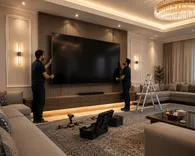
Installing a screen of 60 inches or more
This service includes installing a screen of 60 inches or larger, with secure mounting and configuration.


How to order from the app
- Install the Njik app on your phone.
- Open the “Satellite Services” category and pick “Installing a screen of 60 inches or more”.
- Set the location, add details, then submit the order.
- Track technician acceptance and order status inside the app.
More in Satellite Services
Internal programmingNew outdoor satellite cablingScreen mounting, under 60 inchesSatellite dish alignmentSingle-output satellite LNB installationDual-output satellite LNB installationFour-output satellite LNB installationNew indoor satellite cablingDismantle and install the dish with programmingSatellite systems: 2 satellites with installation and programmingCentral satellite system, 2 distributed satellites, 24 lines, including installation and programmingDescribe the service you need